Price labels, selling and seller payouts.
Hyllyri connects a flea market's goods, QR price labels and selling. Customers pay in cash or by card, also without a network.
Every price label has its own QR code, so Hyllyri knows the price and the seller of each item. At the end of the day you see every seller's payout. The app itself is in Finnish.
The demo opens Hyllyri's price calculator, which a customer uses on their phone to add up the price labels. We are now opening Hyllyri to other flea market organisers as a pilot.
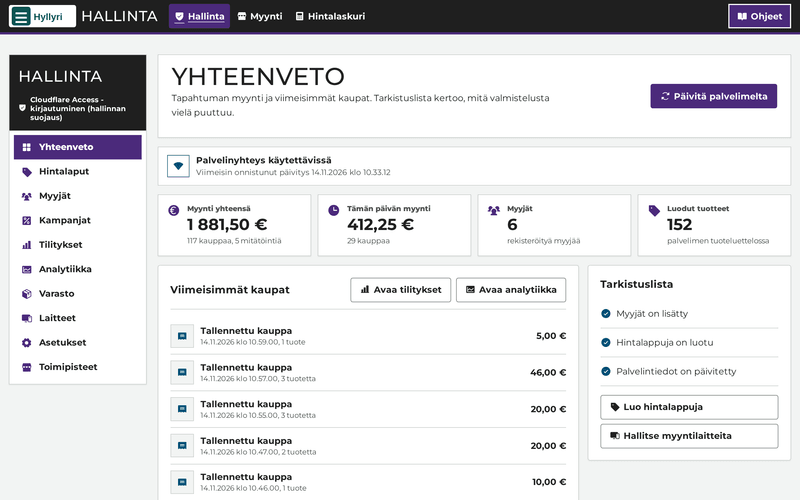
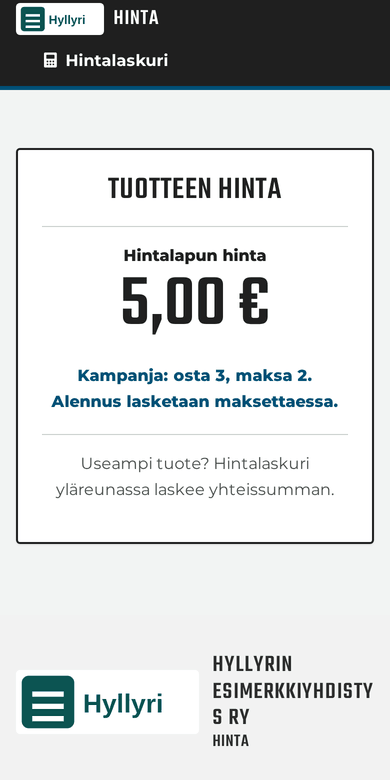
In use

Six things a flea market day rests on
Hyllyri was built for a flea market with many sellers, where changing staff do the selling, paid or volunteers. This is what the organiser and its sellers get.
-
Price labels a seller can trust
Each label has its own QR code, the price and the seller's code. The price of a printed label never changes: a new price means a new label, and the old one is retired. The price the customer sees and the price charged are always the same.
-
Selling carries on offline
A device that has been set up sells without a connection too. Sales are saved on the device and uploaded when the connection is back. Card payments need the network.
-
Every seller's money counted
The payouts view works out each seller's sales, discounts and the organiser's commission. Sellers see their own sales and payout on their own phone.
-
Cash and card, money to the organiser
A cash payment is recorded with one confirmation. A card can be charged with the organiser's own SumUp account, where Hyllyri sends the amount to the terminal, or on any separate payment terminal, where Hyllyri records the sale as a card payment. Hyllyri is not a party to the payment. More about payments.
-
Accessible to sellers and customers
The aim is AAA, the highest level of WCAG 2.2: text contrast of at least 7:1, touch targets of at least 44 × 44 pixels, and keyboard use.
-
The organiser's own name, logo and colours
The name, logo and colours are set in the administration's settings. Hyllyri checks every colour and refuses it if text contrast would fall under 7:1.
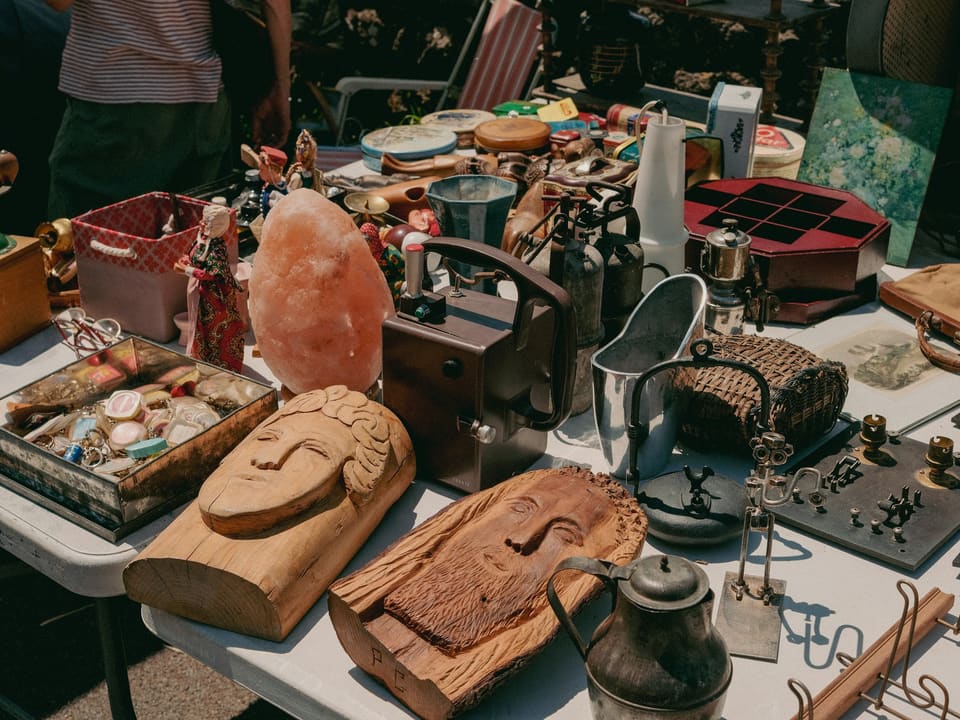
Built for the Salon Vilpas ry flea market, and in use there.
Hyllyri was built for the Salon Vilpas ry flea market. The association uses it there for price labels, selling and seller payouts, and takes card payments with SumUp.
Different organisers, the same Hyllyri
Hyllyri is not only a tool for associations. Price labels, selling and payouts work the same way, whoever runs the flea market.
How a flea market day goes
One piece of information runs from the price label to the payout. That is why every sale lands on the right seller without separate counting.
-
Before the day
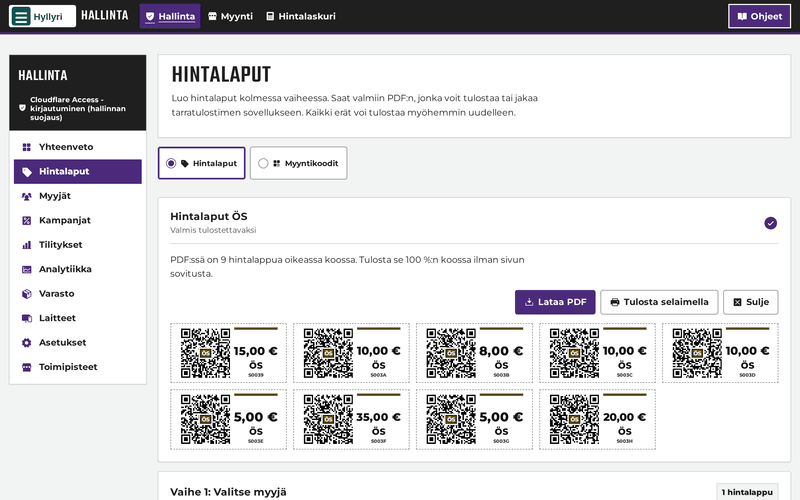
1. Sellers and price labels
Add the sellers in the administration and print their price labels. Labels print on A4 sticker sheets with an ordinary printer, or on a label printer roll.
-
On the seller's phone
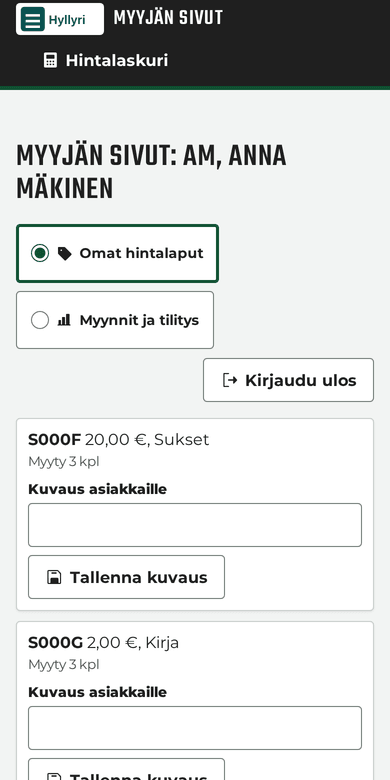
2. Sellers follow their own sales
Sellers see their own price labels, the items that have sold and their payout on their phone. A seller sees only their own data.
-
At the sales table
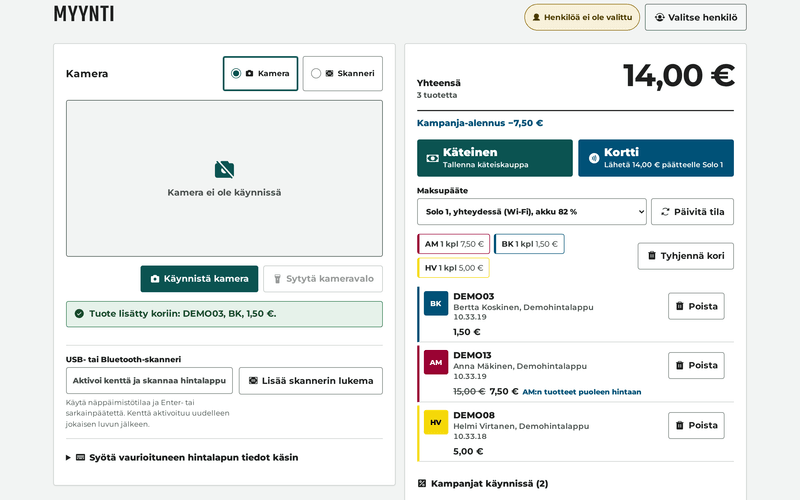
3. Scan the label, the cart adds up
The selling screen reads a label with the phone camera or a USB or Bluetooth scanner. Campaigns apply to the cart on their own. For cash, the selling screen shows how much change to give.
-
Payment
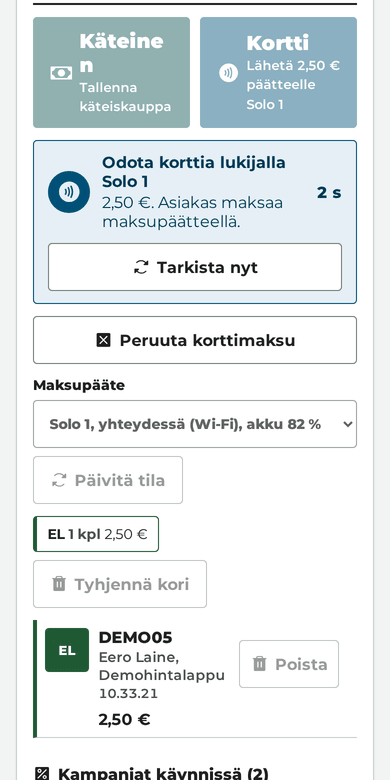
4. Cash or card
Cash is recorded after a confirmation. The card button sends the amount to a SumUp terminal, and SumUp charges the card; a card payment taken on a separate terminal is recorded the same way as cash. Once the payment is approved, Hyllyri saves the sale. The customer can get a receipt on their own phone from a QR code.
-
At the end of the day
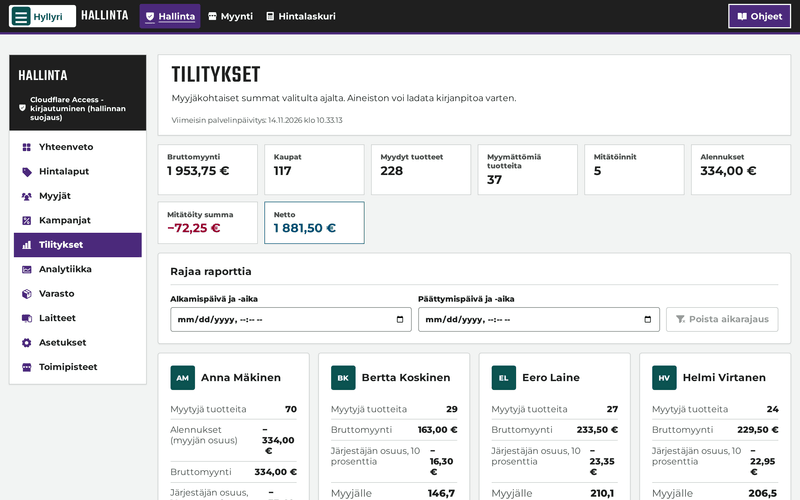
5. A payout for every seller
The payouts view works out each seller's sales, discounts and the organiser's commission. The data is also available as a CSV file.
Selling carries on when the network drops
In a school hall, a clubhouse or at a yard sale the network does not always work. Once a device has been set up, the selling screen opens and sells without a connection too.
- Sales are saved on the device first and uploaded as soon as the connection is back.
- Prices and campaigns are worked out on the device, so they work offline as well.
- An open sale is kept even if the page reloads or the browser closes.
- Card payments need the network. During an outage you can charge the card on the SumUp terminal separately, and Hyllyri records the sale as a card payment.
Clear for everyone to use
At a flea market a very mixed group of people sells and pays. Accessibility is checked by automated tests on every view.
- AAAThe aim is the highest level of WCAG 2.2.
- 7:1Text contrast is at least this in both the light and the dark display mode.
- 44 pxTouch targets are at least 44 × 44 pixels.
- Works with a keyboard, and focus is clearly visible.
- Status is given in words, not by colour alone.
- Motion is left out when the device asks for reduced motion.
- An alternative to the camera: a label can be entered by hand by choosing the seller and the price.
What Hyllyri does not do yet
We say this up front, so you can see whether Hyllyri fits you now or only later.
-
Planned
Stall bookings and stall rent
Hyllyri does not book stalls and does not invoice table or shelf rent. Price labels, selling and payouts already work, but a flea market that rents out shelves still handles bookings and rent elsewhere.
-
Planned
Other ways to pay beside SumUp
Today Hyllyri sends the amount of a card payment to SumUp. More payment providers are planned, so that an organiser does not depend on one provider. A card payment taken on a separate terminal can already be recorded in Hyllyri.
-
Coming
Android app
The app is in testing and has not been released. Until then the selling screen works in the browser of a phone, tablet or computer. More about the app.
-
Now
In Finnish only
The administration, the selling screen and the seller page are in Finnish, and so are the user guides.
Questions and answers
What devices does Hyllyri need?
A phone, tablet or computer with an up-to-date browser is enough for selling. The device's camera reads the labels, but a USB or Bluetooth scanner is faster. Price labels are printed on sticker sheets with an ordinary printer, or on a roll with a label printer. Card payments need a SumUp reader.
What happens if the internet goes down?
A device that has been set up carries on selling. Sales are saved on the device and uploaded when the connection is back. A card payment through SumUp needs the network. During an outage you can charge the card on the SumUp terminal and record a card payment in Hyllyri.
Whose account do card payments go to?
The flea market organiser's own SumUp account. Hyllyri is not a party to the payment: it sends the amount to SumUp and records whether the payment was approved.
Can sellers see their own sales?
Yes. The administration gives each seller a personal sign-in link and a PIN. The seller page shows their own price labels, sales and payout. A seller sees only their own data.
Does Hyllyri suit a flea market that rents out shelves?
Price labels, selling and seller payouts work there too, and every seller has their own code. Hyllyri has no stall booking and no invoicing of shelf rent, so those have to be handled elsewhere.
Tell us about your flea market and we will show you Hyllyri.
Hyllyri is in pilot use. Write to us and we will show it and tell you how to join the pilot.
hello@hyllyri.fi